By CubixKraft Team
AI Workflow Automation: A Complete Guide for Business Leaders
AI workflow automation lets businesses execute complex, multi-step processes end-to-end — without human involvement at each stage. Here's what it is, how it differs from traditional RPA, and how to identify your first automation opportunity.
What Is AI Workflow Automation?
AI workflow automation is the use of artificial intelligence to execute multi-step business processes end-to-end — without requiring a human at each decision point. Unlike traditional automation, which follows rigid if-then rules and stops when something unexpected happens, AI workflow automation can reason through decisions, handle exceptions, and adapt as conditions change.
Traditional automation is a set of instructions. AI workflow automation is a reasoning system. When a traditional automation hits an unexpected input, it stops. When an AI workflow agent hits an unexpected input, it reasons through what to do next — and continues.
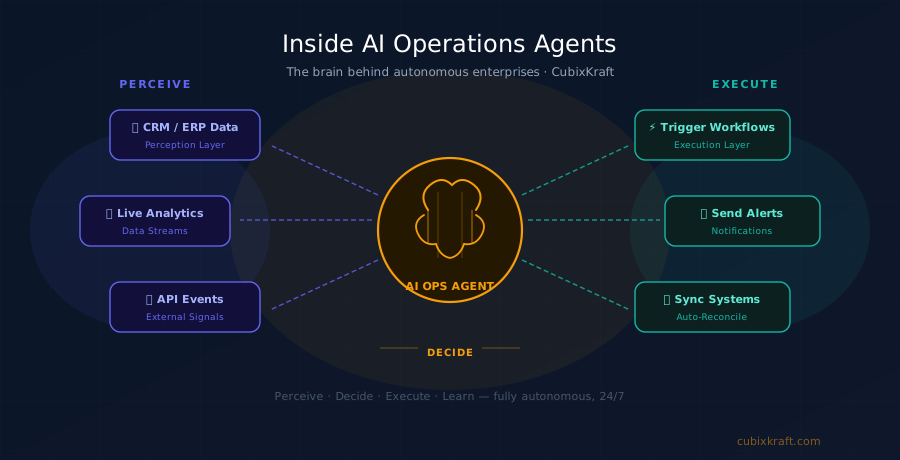
In practice, AI workflow automation connects your tools — taking inputs from one system, making intelligent decisions, and triggering the right actions across CRMs, ERPs, databases, communication platforms, and third-party APIs — all without human oversight for routine cases.
AI Workflow Automation vs Traditional RPA
Robotic Process Automation (RPA) tools transformed workflow automation in the 2010s — but they have a fundamental limitation: they're brittle. RPA works exactly as programmed and breaks the moment anything changes.
| Capability | Traditional RPA | AI Workflow Automation |
|---|---|---|
| Decision making | Rule-based only | AI-powered reasoning |
| Handles exceptions | Stops or escalates everything | Reasons through, escalates selectively |
| Adapts to change | Requires reprogramming | Adapts based on context |
| Unstructured data (emails, PDFs) | No — structured inputs only | Yes — reads any format |
| Multi-step coordination | Linear pipelines | Parallel, branching, self-correcting workflows |
| Improves over time | No | Yes — learns from outcomes |
"The shift from RPA to AI workflow automation is the shift from programming what to do — to defining what you want to achieve, and letting the AI figure out how."
The Core Building Blocks
Events that start a workflow — an email, form submission, CRM status change, schedule, or data threshold being crossed.
The reasoning layer that interprets inputs, applies business rules and context, and decides what to do — or whether to escalate to a human.
API connections to your existing tools — CRM, ERP, databases, email, Slack, calendars. The AI acts across all of them in one workflow.
Policy controls, approval gates, and audit logs for high-stakes decisions. Your team stays in control of what matters.
6 High-Impact AI Workflow Automation Use Cases
1. Lead Processing and CRM Enrichment
Every inbound lead — from web forms, LinkedIn, or ad platforms — is automatically enriched, scored against your ICP, and entered into your CRM with full context. Follow-up sequences trigger instantly, with no manual entry and no delay.
2. Invoice and Accounts Payable Processing
AI reads incoming invoices (PDFs, emails, scanned documents), extracts line items, matches them to purchase orders, flags discrepancies, and routes for approval or payment — eliminating weeks of manual reconciliation work.
3. Employee Onboarding Orchestration
From offer acceptance to day-one ready: AI provisions software access, sends welcome communications, schedules intro meetings, assigns training modules, and syncs HR systems — in the time it used to take a week of manual coordination.
4. Customer Support Triage
Every inbound ticket is classified by type and urgency, enriched with customer history, routed to the right team or resolved autonomously, and logged — with a complete audit trail across email, chat, and phone channels.
5. Anomaly Detection and Incident Response
AI monitors your systems 24/7, detects anomalies, diagnoses likely causes by correlating events across your stack, creates incident tickets, triggers remediation workflows, and notifies on-call teams — before customers notice an issue.
6. Scheduled Reporting and Data Sync
AI pulls data from multiple sources, cleans and transforms it, generates structured reports, and delivers them to the right stakeholders — eliminating the manual data-wrangling that consumes analyst hours every week.
How to Get Started
The most common mistake is trying to automate everything at once. A focused first deployment builds confidence and delivers measurable ROI quickly.
Once your first workflow is live, expand. Add a second. Then a third. Over time, your agents start coordinating — handoffs become automatic — and your business develops a truly autonomous operations layer.
Ready to Automate Your First AI Workflow?
CubixKraft designs and deploys AI workflow automation solutions tailored to your existing tools and business processes — live in weeks, not months.
Explore AI Workflow Automation →